
humla
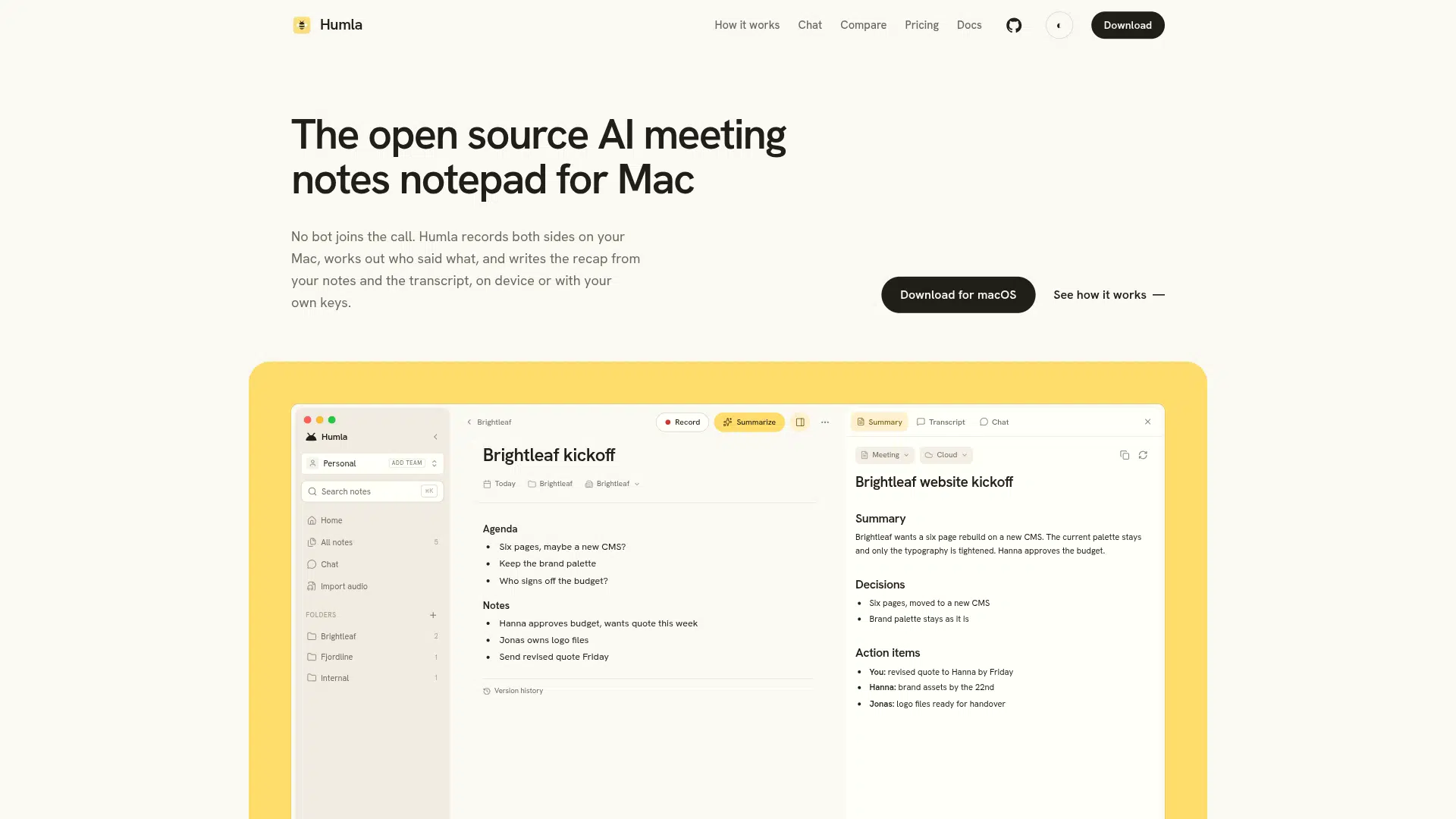
The open source AI meeting notes notepad for Mac.
Quick Answer
AIHumla is an open-source AI meeting notes notepad for Mac users. It records both sides of a call, identifies speakers, and writes recaps from notes and transcripts. Best for solo professionals and small teams prioritizing privacy and local processing. Freemium.
Humla is an open-source AI meeting notes notepad for Mac that records both sides of a call, identifies speakers, and writes recaps from notes and transcripts. It works on-device or with your own API keys, offering privacy and local processing. Free to use; team sync is $5/user/month.
Humla records meeting audio directly on your Mac without a bot joining the call, processes transcripts and summaries on-device or with your own API keys, and is fully open source.
Decision Intelligence
Best For
AIType
Free Trial
Yes
Credit Card
Not Required
Free Plan
Yes
Dimension Scores
· 5.3 avgHow good it is, across universal quality axes
Task Scores
· 5.4 avgWhat it can do, per category it works in · showing 6 of 10 tasks scoring 5+
Scores are AI-estimated from publicly available data — not an independent test or a verified user rating. How we rank →
- -Only available for Apple Silicon Macs (macOS 13 or later)
- -Speaker labels are most reliable for up to six voices
- -App integrations (Slack, CRM) are not supported
- -No mobile app available
- -No Windows or web version available
Complexity
Company Size
Target Team Size
Target Skill Level
Privacy & data handling
The Model(s) Behind It
Model details — extracted from public vendor sources by our pipeline (AI extraction plus a source check) or admin-entered. Shown as claimed by the vendor; not independently audited by Intelloro.

The AI notepad for back-to-back meetings

The unified AI customer support platform
Use Humla's MCP server to search and read meeting notes
Use Humla's MCP server to search and read meeting notes
Send a note as JSON to a URL for automation
Start and stop recordings from humla:// links
Start and stop recordings from humla:// links
Start and stop recordings from humla:// links
Auto-updated
Trust Score
Very Good
Based on 7 data signals
Evidence: 6 of 12 expected facts verified · highest possible score 75
Evidence strength: Strong
Reflects publicly available data, not an independent audit
No published data
Not yet checked
Some details are AI-generated estimates — verify with the vendor.
AI-generated estimate: Best For, Description, Limitations, Quick Answer, Tagline, What Makes Unique
How we source dataAI Governance & Regulatory Disclosures
Legally-sensitive fields — extracted from public vendor sources by our pipeline (AI extraction plus a source check) or admin-entered. Shown as claimed by the vendor; not independently audited by Intelloro.
Switching & Migration
- Full app
- No account required
- Shared team workspace
- Invite teammates by email
- Sync across devices
- Roles that fit (Owner, admins, members, read-only)
- Notes sync through Humla Cloud (hosted in EU)
User Reviews
No reviews yet. Be the first to review!
Top humla alternatives in the same category, ranked by quality.

Fireflies.ai
The #1 AI Assistant For Your Meetings

Fathom
AI notetaking that is out of this world

Fellow.ai
The secure AI meeting assistant for enterprise and regulated teams.

Otter.ai
AI Meeting Notetaker, Transcription & Insights

Tactiq
AI Note Taker for Google Meet, Zoom & Teams

Supernormal
AI agents built for agencies — turn meetings into client work
Looking for more humla alternatives?
Explore our complete list of alternatives with filters for free, cheaper, and higher-rated options.








Who It's For3 rolesGeneral and Operations ManagersProject Management SpecialistsExecutive Secretaries and Executive Administrative Assistants
Platform, Content & Languages2 content types3 languagesTextAudioEnglishNorwegian+4 more
Output Languages
Content Types
Accepts
Produces
Frequently Asked Questions
What can humla do?
humla can: On-device meeting recording, Speaker identification, AI summaries from notes and transcripts, Chat with meeting history. Best for: Solo professionals who prioritize privacy and local processing.
How much does humla cost?
humla offers a free plan, with paid plans starting from $5/month, and includes a free trial.
Is humla free?
humla offers a free plan with limited features. Paid upgrades are available for advanced usage. Paid plans also include a free trial.
What makes humla unique?
Humla records meeting audio directly on your Mac without a bot joining the call, processes transcripts and summaries on-device or with your own API keys, and is fully open source.
What platforms does humla support?
humla is available on desktop.
What languages does humla support?
humla supports 3 languages: English, Norwegian, Norwegian Bokmål.
Does humla work offline?
Yes, humla supports offline use — you can run it without an active internet connection.
Who is humla for?
humla is designed for Solo professionals who prioritize privacy and local processing; Small teams needing shared meeting notes and chat; Consultants managing client meetings.